Lg Lsc27990Tt Page 10
Workshop Manuals
MICOM FUNCTION
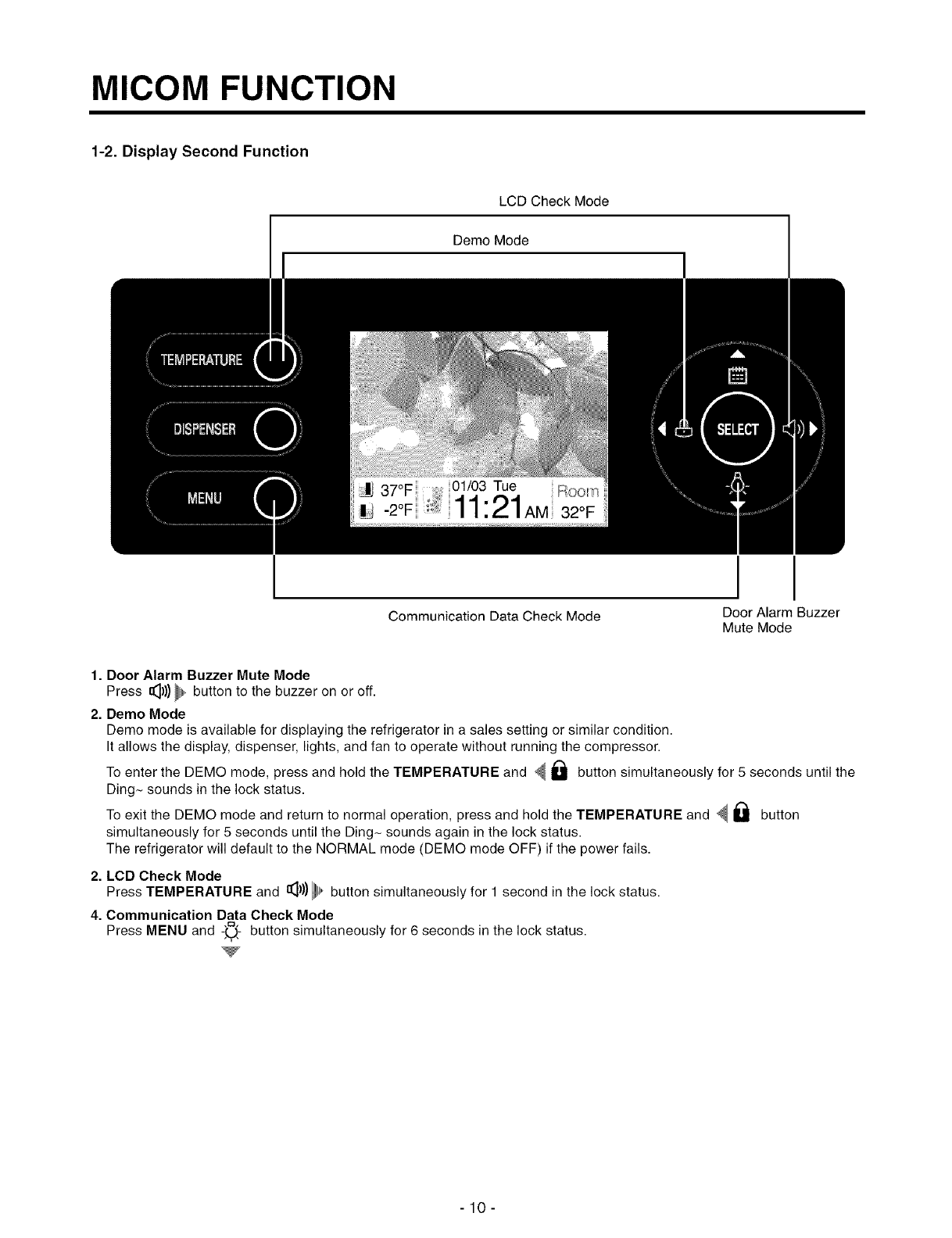
1-2. Display Second Function
LCD Check Mode
Demo Mode
I
Communication Data Check Mode
Door Alarm Buzzer
Mute Mode
1. Door Alarm Buzzer Mute Mode
Press _))) _ button to the buzzer on or off.
2. Demo Mode
Demo mode is available for displaying the refrigerator in a sales setting or similar condition.
It allows the display, dispenser, lights, and fan to operate without running the compressor.
To enter the DEMO mode, press and hold the TEMPERATURE and _ I_ button simultaneously for 5 seconds until the
Ding- sounds in the lock status.
To exit the DEMO mode and return to normal operation, press and hold the TEMPERATURE and _ I_1 button
simultaneously for 5 seconds until the Ding- sounds again in the lock status.
The refrigerator will default to the NORMAL mode (DEMO mode OFF) if the power fails.
2. LCD Check Mode
Press TEMPERATURE and I_))) _, button simultaneously for 1 second in the lock status.
4. Communication Data Check Mode
Press MENU and -',0_ button simultaneously for 6 seconds in the lock status.
-10-
Contents Summary of Lg Lsc27990Tt
- Page 1http://aic.lgservice.com REFRIGERATOR SERVICEMANUAL CAUTION PLEASEREAD CAREFULLY THE SAFETY PRECAUTIONSOF THIS MANUAL BEFORE CHECKING OR OPERATINGTHE REFRIGERATOR. MODEL : LSC27990TT COLOR : TITANIUM
- Page 2CONTENTS WARNINGS AND PRECAUTIONS FOR SAFETY ................................................................................................................ 3 SPECIFICATIONS .............................................................................................................................
- Page 3WARNINGS AND PRECAUTIONS FOR SAFETY Please observe the following safety precautions to use the 8. Do not fray, damage, run over, kink, bend, pull out, or refrigerator safely and correctly and to prevent accident or twist the power cord. injury when servicing. 9. Check for evidence of moisture intrus
- Page 4SPECIFICATIONS 1. Ref No. : GR-G277STSA(LSC27990TT) ITEMS SPECIFICATIONS ITEMS SPECIFICATIONS DIMENSIONS 908 x 896 x 1771 mm DRIER MOLECULAR SIEVE XH-7 WxDxH (3511/16x355h6x69W16 in.) CAPILLARY TUBE ID a0.83 NET WEIGHT 145 kg (319.7 Ibs.) FIRST DEFROST 4 - 5 Hours COOLING SYSTEM Fan Cooling DEFROST
- Page 5PARTS IDENTIFICATION 1. Ref No. : GR-G277STSA(LSC27990TT) PWB Cover \\\,_ Frame Display Water Tubes /.- / Dis Ice & Dispenser Button L_ c? ............. _ === '}i!l]J!iili Freezer Refrigerator Compartment Compartment Dairy Product Corner Water Filter Automatic Lamp Icemaker Shelf Shelf Lamp Snack Dr
- Page 6HOW TO INSTALL REFRIGERATOR 1. How to Adjust Door Height of Refrigerator • Make the refrigerator level first. (If the refrigerator is not installed on a flat floor, the height of freezer and refrigerator door may not be the same.) 1) If the freezer door is lower than the refrigerator 2) If the freez
- Page 7HOW TO INSTALL REFRIGERATOR 2. Filter 2) Replace with a new cartridge. Replace the filter when the indicator light comes on or the Take the new cartridge out of its packaging and remove performance of the icemker or water dispenser decreases protective cover from the o-rings. noticeably. With cartri
- Page 8HOW TO INSTALL REFRIGERATOR 3. How to Control the Amount of Water Supplied to Icemaker. 3-1. Confirm the amount of water supplied to the icemaker. 1) Confirm the amount of water supplied to the icemaker (1) Press the button (Figure 1) to selsct the level of water (Optimum level --* Large -=, Small.)
- Page 9MICOM FUNCTION 1. Monitor Panel 1-1. G R-G277STSA(LSC27990TT) Temperature Adjust Button - Calendar & oe OSe,ect,oo / Dispenser Selection u, ooJ Button ' I' Lock Button Door Alarm Button Dispenser Light Button -9-
- Page 10MICOM FUNCTION 1-2. Display Second Function LCD Check Mode Demo Mode I Door Alarm Buzzer Communication Data Check Mode Mute Mode 1. Door Alarm Buzzer Mute Mode Press _))) _ button to the buzzer on or off. 2. Demo Mode Demo mode is available for displaying the refrigerator in a sales setting or simil
- Page 11MICOM FUNCTION 2. Description of Function 2-1-1. Function of Temperature Selection Division Power Initially On 1st Press 2st Press 3th Press 4th Press Setting Temperature Temperature COLD COLDER COLDEST COOL COOLER Control Freezer Control -2 °F -5 °F -8 °F 7 °F 1 °F Refrigeration 37 °F 34 °F 32 °F 4
- Page 12MICOM FUNCTION 2-1-3. Lock function 1. If desiring to lock the dislay the dispenser and control panel, push on _ _ button more than 3 seconds. Lock icon is appeared at the right of display with lock status. 2. The buzzer sound and control panel and dispenser function is not performed even if pressin
- Page 13MICOM FUNCTION 2-2. Dispenser use selection You can select water or ice. =_:Select WATER, CRUSHED ICE, or CUBED ICE by pressing the DISPENSER button as you desire. =_:Use your cup to press lightly on the actuator. • Each graphic is indicated for the selected function. • You'll hear a CLICK when the
- Page 14MICOM FUNCTION 2-5. ICE PLUS freezing 1. ICE PLUS freezing is a function to increase the cooling speed of the freezer compartment by running both the compressor and the fan simultaneously. 2. ICE PLUS is cancelled and the refrigerator returns to its default setting in the event of a power interrupti
- Page 15MICOM FUNCTION 2-7. Control of variable type freezing fan 1. To increase cooling speed and response to load, the MICOM will vary the speed of the freezer fan between low and high. 2. The MICOM runs the fan at high speed only at power-up and for ICE PLUS cycles, and runs at low speed for all other se
- Page 16MICOM FUNCTION 2-11. Ringing of manual operation, manual frost defrost buzzer 1. The buzzer sounds briefly when the test button on the main PCB is pressed. 2. If you select manual operation, the buzzer sounds three times for 2/lOsecond each, then it sounds three times for 2/10 second each every thir
- Page 17MICOM FUNCTION 2-14. Sequential operation of components Component products such as compressor, frost removal heater, freezing room fan, cooling fan, and step motor damper are sequentially operated as follows for preventing noise and part damage occurred due to simultaneous operation of many parts in
- Page 18MICOM FUNCTION 2-15. Failure Diagnosis Function 1. Failure diagnosis facilitates service when a failure code shows during product operation. 2. When a failure is detected, the buttons are deactivated. 3. If a failure code is released, the MICOM resets and normal operation continues. 4. The failure c
- Page 19MICOM FUNCTION ALL DISPLAYPARTSTURN OFF OTHERTHAN FREEZER ROOMNOTCH TEMPERATUREDISPLAYAND REFRIGERATORROOM NOTCH TEMPERATUREDISPLAY(FAILURECODE INDICATIONPART) IN CASEOF INDICATINGFAILURE MODES(EXCEPT FORNOTE1, NOTE2) NOTE1 ) FREEZER ROOM NOTCHTEMPERATUREDISPLAY AND REFRIGERATORROOMNOTCH TEMPERATURE
- Page 20MICOM FUNCTION 2-16. Test Function 1. The test function assists in diagnosing the PWB and determining the exact mode of failure. 2. The test button is on the main PCB. When test mode is engaged, it will complete its test cycle and default to normal operation within 2 hours. 3. The buttons are disabl
- Page 21MICOM FUNCTION 2-17. Dispenser Function 1. The dispenser allows serving ice and water without opening the door. 2. Pressing the dispenser switch dispenses crushed or cubed ice or water. If ice is selected, the switch operates the door solenoid also. The door will close 5 seconds after the ice is dis
- Page 22EXPLANATION FOR MICOM CIRCUIT 1. Explanation for PWB circuit 1-1. Power circuit The power circuit includes a Switched Mode Power Supply (SMPS). It consists of a rectifier (BD1 and CE1) converting AC to DC, a switch (IC2) switching the DC voltage, a transformer, and a feedback circuit (IC3 and IC4).
- Page 23EXPLANATION FOR MICOM CIRCUIT 1-2. Oscillation circuit The oscillation circuit generates a basic clock signal for synchronization and time calculation related to the transmission of data and calculations made by the M ICOM (IC 1). The oscillator (OSC1) must always be replaced with an exact replaceme
- Page 24EXPLANATION FOR MICOM CIRCUIT 1-4. Load/dispenser operation, door opening circuit 1. LOAD DRIVING CIRCUIT =_The fan operates at the regular speed even if the door of the refrigerator or freezer is opened. When the doors are closed, the fan reverts to its original speed. =_(A), (B), (C), and (D) of d
- Page 25EXPLANATION FOR MICOM CIRCUIT 1-5. Dispenser operation circuit (1) GR-G277STSA(LSC27990TT) R¥7 EALEI_I21 , , 09 9 KID 5003_ PaO IALEJEI_I21 IO Pol ALOI_2 o IWlO II Po2 Z ALOI_2 co Po3 RYIO E2 _DI_2 < c@ Ps IE £N ---_ 0 , R- _ ...... -_-Y4 ............... _ 15 P21 1_007 FN414B n_ 1) Check load drivin
- Page 26EXPLANATION FOR MICOM CIRCUIT 1-6. Door opening sensing circuit (1) GR-G277STSA(LSC27990TT) 40 C6_ F-_ _Jw ICI (MICOM) CCZI* R_030R S/_ ....... Measuring part ................ ............ ICl (MICOM) No. (44, 45) / (45, 46) / (47, 48) Pin Door of Freezer and Refrigerator Closing 5 V ((_)- (_, (_- @
- Page 27EXPLANATION FOR MICOM CIRCUIT 1-7. Temperature sensing circuit (1) GR-G277STSA(LSC27990TT) F-SENSOR -- IAI_] Z -- P65 D-SENSOR C05, i CO RI-SENSOR IAINZ} 0_ _3 S CC23']_ R2-SENSOR _AIN3J Ii P_4 IAIN4_ ccea,_ MA_/OPTI - FF_SH or) o /50V R- The circuits involving the freezer and refrigerator sensors c
- Page 28EXPLANATION FOR MICOM CIRCUIT 1-8. Switch entry circuit The following circuits are sensing signal form the damper motor reed switch for testing and diagnosing the refrigerator. (1) G R-G277STSA(LSC27990TT) ICI P40 41 T 4=7K 28_ o 5Wlo (MIC©M) _k CCIO* _223 1-9. Option designation circuit (model sepa
- Page 29EXPLANATION FOR MICOM CIRCUIT 1-10. Stepping motor operation circuit (1) GR-G277STSA(LSC27990TT) The motor is driven by magnetism formed in the areas of the coils and the stator. Rotation begins when a HIGH signal is [ ] Jcl0 CON7 9,16 TA7774P ICI CEI3 1,2 (MI00M) /50V E4 I0 P35 II II ST/OPB 86 P36
- Page 30EXPLANATION FOR MICOM CIRCUIT 1-11. Fan motor driving circuit (freezer, mechanical area) 1. The circuit cuts all power to the fan drive IC, resulting in a standby mode. 2. This circuit changes the speed of the fan motor by varying the DC voltage between 7.5 Vdc and 16 Vdc. 3. This circuit stops the
- Page 31EXPLANATION FOR MICOM CIRCUIT 1-12. Temperature compensation and temperature compensation circuit 1. Temperature compensation in freezer and refrigerator (1) GR-G277STSA(LSC27990TT) ]CL R_ TRI7 _>EOK Temperature compensationat refrigerator 56 [AINO} P61 _-,R_,F_ - _ _ ternperaturecornpensationatfree
- Page 32EXPLANATION FOR MICOM CIRCUIT I_ Temperature compensation table at the refrigerator is as follows: _ resistance \ 470 _-_ 2 kL-_ i 3.3 kL-_ 5.6 k'_ 8.2 kL-_ 10 k'_ 12 kL-_ 18 kL-_ 33 kL-2 56 k_-2 180 k'_2 Current "" -_.[ [resistance ...................................................................
- Page 33EXPLANATION FOR MICOM CIRCUIT 2. Compensation circuit for temperature at freezer (1) G R-G277STSA(LSC27990TT) RE8* EOK Rig* EOK R20 _ i EOK i i R21 I IOK _ i ii R22. EOK R23_ Temperature compensation in CUT JCR1 +1 °C [+1.8 °F] +2 °C [+3.6 °F] JCR2 +1 °C [+1.8 °F] JCR3 -1 °C [-1.8 °F] -2 °C [-3.6 °F
- Page 34EXPLANATION FOR MICOM CIRCUIT 1-13. Communication circuit and connection L/Wire between main PCB and display PCB The following communication circuit is used for exchanging information between the main MICOM of the Main PCB and the dedicated MICOM of the LCD Display PCB. A bi-directional lead wire as
- Page 35EXPLANATION FOR MICOM CIRCUIT 2) Sensor resistance characteristics table Refrigerator sensor 1&2 Measuring Temperature (°C) Freezing Sensor Defrost sensor, Ambient sensor -20 °C 22.3 k_-_ 77 k_-:' -15 °C 16.9 k_-_ 60 k_-:' -15 °C 13.0 k_-_ 47.3 k_-:' -5 °C 10.1 k_-_ 38.4 k_-:' 0 °C 7.8 k_-:' 30 k_-:
- Page 36EXPLANATION FOR MICOM CIRCUIT 1-14. OptiFresh stepping MOTOR/Display (1) GR-G277STSA(LSC27990TT) CON8 Rra9 2f_.IKF F_ lAIN41 MA_LC/_M/_TI-F_SH _v_ TA7774P %_) 9,16 A iCu_6 1,2 Z ISTEPPlNG ] P_4 2h IC_ IOK 1(3{ ST/ L_ Pl5 22 23 _ / ° 61 PI6 1 A 3__ CO 4,5,- 2,13 EL r_7, H- _- ..... 2K L]Oi L302 L303
- Page 37EXPLANATION FOR MICOM CIRCUIT 2. PWB parts diagram and list 2-1. PWB Assembly, main part diagram (1) G R-G277STSA(LSC27990TT) -37 -
- Page 38EXPLANATION FOR MICOM CIRCUIT 2-2. Parts list (1) GR-G277STSA(LSC27990TT) - 38 -
- Page 39EXPLANATION FOR MICOM CIRCUIT _e 4a;zo,_3OOT,_ EAT S_ _47 7Z_O304_ _ - 39 -
- Page 40EXPLANATION FOR MICOM CIRCUIT 2-3. DISPLAY ASSEMBLY part diagram (1) GR-G277STSA(LSC27990TT) No. @_m = @_uj @,_4 ,_!#U m°_ 1 A01010088 32BIT RISC MICROPROCESSOR - SAMSUNG 8302410A20-YO80 EA 2 A01030086 TT IC - SO14 741V14D EA 3 A01040024 PIC - MACROCHIP PIC18F2520 (SO28) - LG J,_2 EA 4 A01050043 MOS
- Page 41EXPLANATION FOR MICOM CIRCUIT 47 A02012003 Resstor-J 120KQ-5%-0603 (RC1608Ji24CS) EA t 48 A02012006 Resstor-J _70Kq-5%-0603 EA 1 49 A02012009 Resstor-J 310K_;-5%-0603 EA 1 50 A02012011 Res stor-J I M_2-5%-0603 (RC1608J105CS) EA 2 51 A02012024 Resistor-J _00K_-5%-0603 EA 1 52 A02012034 Resistor-J 360
- Page 42EXPLANATION FOR MICOM CIRCUIT 2-4. DISPLAY circuit diagram (1) GR-G277STSA(LSC27990TT) ARM920T Instruction Instruction External MMU CACHE Coproc (16KB) Interface JTAG AMBA Processor core Bus • ARMSTDMI (Internal EMbedded ICE) Lnf Data WriteBack Data CACHE PA Tag MMU (16KB) RAM 4" TFT LCD LCD CeNT LC
- Page 43EXPLANATION FOR MICOM CIRCUIT 3. PWB Circuit Diagram may vary by model. (1) GR-G277STSA(LSC27990TT) _T C) EO () p-.. m O_ 272 U3 0 _w ,% - 43 -
- Page 44EXPLANATION FOR MICOM CIRCUIT ...................... _-s_,_m DI_ L]GWT ore, sin _ 2_ _ T_" T ,T s ............. i - 44 -
- Page 45ICEMAKER ANDDISPENSER WORKING PRINCIPLES ANDREPAIR 1. OPERATION PRINCIPLE 1-1. Operation Principle of Icemaker • Adjusts EJECTOR to Start Position with power on. Icemaking • Waits until water becomes cold after starting the icemaking operation. Harvest • Runs MOTOR to drop ice from the tray into the
- Page 46ICEMAKER ANDDISPENSER WORKING PRINCIPLES ANDREPAIR 2. ICEMAKER FUNCTIONS 2-1. Start Position 1. After POWER OFF or power outage, check the EJECTOR's position with MICOM initialization to restart. 2. How to check if it is in place: - Check HIGH/LOW signals from HALL SENSOR in MICOM PIN. 3. Control Me
- Page 47ICEMAKER ANDDISPENSER WORKING PRINCIPLES ANDREPAIR 2-5. Function TEST 1. This is a forced operation for TEST, Service, cleaning, etc. It is operated by pressing and holding the Fill Key for 3 seconds. 2. The test works only in the Icemaking Mode. It cannot be entered from the Harvest or Fill mode. (
- Page 48CIRCUIT (1) G R-G277STSA(LSC27990TT) CIRCUIT DIAGRAM DELUXE - H/BAR PART(H/BAR HEATER,DOOR S/W),CAPACITOR PART, PLUG TYPE, COMPRESSOR EARTH PART, P.T.C ASSEMBLY ON CIRCUIT DIAGRAMS ARE SUBJECTTO CHANGE IN DIFFERENT LOCALITES AND ACCORDANCE WITH MODEL TYPE. • FUSEPARTAPPLiCATiON(OPTiONAL) - N: NEUTRA
- Page 49TROUBLE DIAGNOSIS 1. Troubleshooting CLAIMS. CAUSES AND CHECK POINTS. HOW TO CHECK 1) No power at outlet. * Measuring instrument: 1. Faulty start 2) No power on cord. Multi tester Bad connection between plug and adapter (faulty plug). • Check the voltage. _The distance between pins. If the voltage i
- Page 50TROUBLE DIAGNOSIS CLAIMS. CAUSES AND CHECK POINTS. HOW TO CHECK 2. No cooling. 2) Refrigeration system is clogged. • Heat a clogged evaporator to Moisture check it.As soon as the Residualmoisture Air Blowing. Notperformed. clogged. intheevaporator. cracking sound starts, the Tooshort. evaporator wil
- Page 51TROUBLE DIAGNOSIS CLAIMS. CAUSES AND CHECK POINTS. HOW TO CHECK 3. Poor Cooling 1) Refrigerant Partly leaked. • Weldjointleak. Partsleak. 2) Poor defrosting capacity. • Check visually. F Drain path (pipe)clogged. Injectadiabaticsintodrain Inectthroughthe i h°se" i hole. i [ Sealwithdrain. i Foreignm
- Page 52TROUBLE DIAGNOSIS CLAIMS. CAUSES AND CHECK POINTS. HOW TO CHECK 3. Poor Cooling Residual Weakheatfrom heater. SheathHeater- rated. frost. Tooshortdefrostingtime. DefrostSensor. - Faultycharacteristics. Seat-D(missing,location,thickness). Structuralfault. Gasketgap. Air inflowthroughthe fan motor. Ba
- Page 53TROUBLE DIAGNOSIS CLAIMS. CAUSES AND CHECK POINTS. HOW TO CHECK 3. Poor Cooling 4) No cooling air circulation. Faultyfan motor. Fan is Fanshroudcontact.- Clearance. constrained. Dampingevaporatorcontact. Accumulatedresidualfrost. Small coolingair Insufficient Fanoverload.- Fan misuse. discharge, mot
- Page 54TROUBLE DIAGNOSIS CLAIMS. CAUSES AND CHECK POINTS. HOW TO CHECK 4. Warm 1) Clogged cooling path. refrigerator Adiabaticsliquid leak?. compartment Foreignmaterials.- Adiabaticsdump liquid temperature. 2) Food storage. Storehotfood. Storetoo muchat once. Dooropen. Packagesblockair flow. 5. No automati
- Page 55TROUBLE DIAGNOSIS CLAIMS. CAUSES AND CHECK POINTS. HOW TO CHECK 6. Condensation 4) Condensation on door. and ice Condensation on the duct door. - Duct door heater is cut. formation. Condensation on the _ RecessHeateriscut. dispense recess. • Ductdoor isopen./ Foreignmaterialclogging. Condensation on
- Page 56TROUBLE DIAGNOSIS CLAIMS. CAUSES AND CHECK POINTS. HOW TO CHECK 7. Sounds 1) Compressor compartment operating sounds. Transformer sound. Badconnection.--Correct screwconnection. Drip tray vibration sound., Badassembly. Distortion. Foreignmaterialsinside. Back cover machine sound. _ Badconnection. Pa
- Page 57TROUBLE DIAGNOSIS CLAIMS. CAUSES AND CHECK POINTS. HOW TO CHECK 8. Faulty lamp 1) Lamp problem. / Filament blows out. (freezer and Glass is broken. refrigerator 2) Bad lamp assembly. Not inserted. / compartment). Loosened by vibration. 3) Bad lamp socket. Disconnection. Bad soldering. • Bad rivet co
- Page 58TROUBLE DIAGNOSIS CLAIMS. CAUSES AND CHECK POINTS. HOW TO CHECK 10. Structure, 1) Door foam. appearance, Sag. Hingeloose Boltis loosenedduring and others. transportation. Nottightlyfastened. Fastenerwornor damaged. Weakgasket Gasketsealingsurfacedefective. adhesion. Fixedtape. Notproperlyattached. N
- Page 59TROUBLE DIAGNOSIS o_ "_ E E O 0 _._ z_ n- d d o d d 0 _ o P.. P.. • • ._c .__ ,o o .J "_ ".Z E o o > _ _ _ z -a° o _ d • "o o o _ _ c ° ___>o__ _ •__ o o_._ o _.. o o c o _ _= i.E _ o cc rr rr rrcc_ _ • o _ J o2_.- o _ o = o8_o o.s =F_ _o_ .- • _ o o o o • o O O O o N _ _ o 0 0 d o • •J _ JO O 0 o J
- Page 60TROUBLE DIAGNOSIS q) .£_ (D O3 q) 03 E n-. _- __ ._ _ _ oy =E _._OE_ E £ ,_ ..c _._•_ "_ :5 _>_o _" 5=oo el. o 0 _ _-_ _ ..Q o_ (.3 O) _- o "_ o $o o> _o> $_ d) d) e5 • 0 (D 0 0 O rr r7 r7 rr rr _ 4.,-; d O O_ o 05 d _ 8 o-_ "._ -5 O _'N 0 (D "_ 0 O5 ¢ .__ .J ¢ -._ N -- 0 u_ o "N u_ 0 •_ _ _ E_ _- o
- Page 61TROUBLE DIAGNOSIS o o E E $ $ C3 o _ • ,gr2 _ C * _ _ ° ° $ o o N >_ 0 CO > q) d) 6 __ _ _ _ _ __-__ _ _ o 0 _ _ 0 _ 0 ,zz 0 .,: cd ,d [d o'_ 8 , gz_ 1/) 03 O "6 o_ o .,zz G: aO _3 1/) ,E E '5 -= o ..Q O o q • _._ 8 -61 -
- Page 62TROUBLE DIAGNOSIS o o o o Q_ o _Q E $ "_ ..C: E 13.) .w .,_J c_ _ E -_ _ _ _= :__° o -,I o O E o o "_3 o d 0 0 rr o _ • • .c: "_ _ o 09 .w o o O .c • "-- ¢0 ¢0 m x: o O9 .._ 0 • 0 • o o • 0 0 0 .,: 0 .,: o ,-: ed _9 _9 o O_ E o o o o E 8 o 69 o o o o E o_ o _x _ E 0 o _ o u_ o I/) • • • 0 - 62 -
- Page 63TROUBLE DIAGNOSIS ._ o ,_ "_ ,_ o_ "_ CD ..C n-. -- _ -.Q o0 ._= -_ _e ,_ co c .c c .a co .m o_ o _.- -_ (D ._ o .o- _ .= 0_ o _.-= _ 0 .ZZ q_ o0 E do_ _ .-_ -- 0 rr o o 03 _ _ _ X_ - -_ -_ _ _ m o° m _ m 0 _- -a _5 "r • u_ q_ o _ _-_ c o > o ,_,, __ • _ • .J _c ",_ _ o o_ z _ • _ "_ _ > "_-Xo_g 0 o
- Page 64TROUBLE DIAGNOSIS 03 E c "r_ c 03 o o 8 E ¢ E .= 03 _ o c m _..._ ,o _ E = "_ ..c: w o ° _ _ _ _ U_ i .-- _ 09 _ -- E O3 .-- .-- o _ d = =._ =_ _ .=o_ =_ co O c "o_ ,-- _=o _o _ __ c c •- _ _ @ • (1) o ..__o_o = -_ -_ _ ._ .c: 8 0 o ._ 8 _ o o__._ o3_ _ _ _ _ _ o _ __ (,,i _ c _. 0) •= _,_ (/) (D _.
- Page 65TROUBLE DIAGNOSIS o E o __ =°_ _-_o° o_ = -d ,o o ,o oo_ o o _ 0 _.-_0 _ _ ,o o o_O _ _ 0 _- 0 _ 0 E _ • n-. • o • -_ _ o o ,° ° _- "-- _ _0 o .,_J o o 09 o _ E ,o .o o_ _o E _ 0 E o_ "o o o o _ o .- ;ooX "o o XE Q) . .w "_ O] O_ o C • o E o o o_ "o o o _d o _ o e5 o o o o°_ r_ 0 o o o E _ • o e5 o
- Page 66TROUBLE DIAGNOSIS -._ >, e3 o n-. o E 8 "_ e3 _-- d) (D (D ..c:: o "=. o o ¢ E 03 E ¢ ,o8o o o @ o o o o .= "_ O ¢ 03 > o E m o _ •w @ o o e5 e c 8 o o 0 (D rn 0 0) "_ O O _ "u Cl3 • ._ $ _; d "5 _ _ "- _ "- "- _'= o 0 ._q O "_ V5 O . o o_ .__. _ _ _-_ 8_ ,_'_- O O (D o E _ o- &_.__ "_5 O) .O 09 09
- Page 67TROUBLE DIAGNOSIS E O er o9 >_ • "_ o° ._c o • o _ = _6 _0 E _cz "o c • o_ .- o "- _ _ _ • co ,o oo _- _ _ _ __ o• - _ ._ _ • _ _ d o .o "o c c .w o ._ _ o _5 c o_ _5 o e5 c • • o N • • e5 "o o ._ 09 o- E oo "-E c o_ c o ,o 0 o o_ o _o_o 0 o o _ _ o o ° :E.- m o c .w _ .m 0 _ • 09 _ ._. o __ _._ _ o
- Page 68TROUBLE DIAGNOSIS E n-. ..-L o _ S $ 03 _ 09 _ __ =_ o .*=_ o _-_ o 03 •- s _ _ o° 0 oo 03 C 09 CO _.. o =_'_S o_O o _ o o=_ - = o co o E "- = v, "_. _ o _ o _ "s o o _: _ o _ _- o o S _ -_ sO E t- 8S 7" ' & & _ 4- C .w _, o d ._ 0 o O o = _8 o (D o E "_ o X _ (D "-- (D .c: •- . _ N =_N_ _= o o _ O
- Page 69TROUBLE DIAGNOSIS E .c (D C7) (D c E O o_ _ _ _ o 0_ _D -_ _ _ _ _ o ¢ _ 03 .-- ._ -_ .__ .___ _-_ _ _ _ _ _ _ X 0 ¢ ._ -- o EL _. o° L.U o O b b O _D c N E E 0 0 C _ o o _ O (D (D O O >, N -0 -0 _ __ 0 0 o_ o_ _ o _ o _ -_._ -_ "-- ._ .c _ _3 .c C 0 O_ _ E_ E (3) -C O3 O 0 .__ 0 "_ 0 o o o _ o C 0
- Page 70TROUBLE DIAGNOSIS o u_ Q_ o _ co "N E rr _ E o co CD O -o O ¢ o 09 Y_ o o o o • _ ,= .__ ._ _ _6 o N _'_ _ oE ,_ d 0 ° _ =_ o o O _53 CO _BZ d _ O O CO CO O _° 0 13.. _ 0 r'r" 0 (D ._o (D _:_8 o _ J d o q; N •J J_ O _ _.-_ _-_ O %5 2_ .._ J ,£2 .gr2 © o o9 N 0 0 o 0 E .d .x E E £ o o u_ Q o o u_ o o
- Page 71TROUBLE DIAGNOSIS u_ o t_ "5 o E o .c _ o .c _ rr .o "_ c _ _ X _ _ X c5 6 o © co 13- >, u_ ,= c_ 13- @ s _2._ 13_ P.. _._ (D (D (D _o 0 0 0 0 (D (D r_ (D r'r _SSoS rr O_ "_ c s "5. 09 o o "U _ _.__I_ 0 o _ 13- c c_ g _ e- o c .__ ._ 0 co _ -- _ ._o_2 > "_ _ _ .-- o o O3 _ _ __ _-_ _c'_ _ _ _ o "--
- Page 72TROUBLE DIAGNOSIS c .w •_ _ ; X o _o o _ O o o o o o o O C _ O o o o "_ d 0 0 -- N __ 135 "O o _.__ O _ o_ _ "_ CO x cc _ _ L_ o >- O N 13_ (D o (D • _ _a _ _ o c O _ II O O _ o ___5 _ _-.__ _ _ _. _. m rr m rr _ e,l rn c o ._ O a_ O3 NI o -_ rn v _ Q- ID3 _ C "-- o (D O C _ O ,.: _ ._ _ cd 0 _-_ o
- Page 73TROUBLE DIAGNOSIS 03 E _ ._ ._ o _ _ n,. __ ___ o_._ _ o O Q.- c _ _ ,_ < u O 03 E .c: o ___ _-_ "_- pr" _ o n- Q_ CC _ _2 ¢o ¢o E E P- E •-- o C3 E o Y o 7£ _ rn o O o O _ o_ O3 _ O _ _ __.__ •_ _ _ 03 _._"- "N O E O "_ .c: O .__ ._ c o _o > P.- > o O0 _ .- .m _ .m "_ o __ o 1/) "_ _'_ N c_ 03 O o
- Page 74TROUBLE DIAGNOSIS (I) 03 o "5 E o o c "_ o• _ ._ _"_ 0 "_ _ _ _ o _ o o .__ _ _ _ X rr "_ ¢ o >- o_ o (D 0 _3 v Q_ £ -o 0 -__ _D 0) '_ 8_ • _ _ >- _ N _._ 0 -- 03 0) 0) 0) 0) 03 _3 03 "_ O 0) ,m 0 03 _3 0 E £ 0 03 03 o 03 0) o O _3 E ¢ 03 03 0) E _ o o _) ,zz 03 03 _ N a. --- © o E o £ 0 _D _3 03 03
- Page 75TROUBLE DIAGNOSIS o (D E o .o _ E _ 0 G: .d o (D N U >=o ; _ m m q) £ _ u_ E _ P- 0 "o 03 (D 0 o o o (D _ _ 0 rr _ o m rr _ _2 _2 o 2- o o 0) rr 0_ kO o o "- 0) >- rr o O m _" m >- o >- o rr I:1) v _ _ _ _ .-_ > £ _ o _=o} =o 2_ O o o o O O cc O O O E _ E -o £ o o .o _ _ _ z -o o d) _ (D (D o "_ o €
- Page 76TROUBLE DIAGNOSIS 3. Cooling Cycle Heavy Repair 3-1. The Heavy Repair Standards for Refrigerator with R134a Refrigerant NO. Items Unit Standards Purposes Remarks 1 Pipe and piping Min. Pipe: within 1 hour. To protect The opening time should be reduced to a system opening time. Comp: within Moisture
- Page 77TROUBLE DIAGNOSIS 3-2. Summary Of Heavy Repair Process Contents Tools - Cut charging pipe ends and discharge refrigerant from Filter, side cutters drier and compressor. - Use R134a oil and refrigerant for compressor and drier Pipe Cutter, Gas welder, N2 gas - Confirm N2 sealing and packing condition
- Page 78TROUBLE DIAGNOSIS 3-3. Precautions During Heavy Repair Items Precautions 1. Use of tools. 1) Use special parts and tools for R134a. 2. Recovery of refrigerant. 1) Continue to recover the refrigerant for more than 5 minutes after turning the refrigerator off. 2) Install a piercing type valve on the h
- Page 79TROUBLE DIAGNOSIS 3-4. Practical Work For Heavy Repair Items Precautions 1. Removal of residual Evaporator Low pressure side refrigerant. tL Observe the sequence for removal of refrigerant. _ (If KEY not,POINT compressor oil may Refrigen_.__.._Helease Condenser ide leak.) Intake 1) Continue to recov
- Page 80TROUBLE DIAGNOSIS Items Precautions 4. Vacuum degassing. Evaporator Suction pipe Compressor Hot Line Dr_ier Blue pressure T _- High LowYellow t pressure Red - If power is applied KEY POINT during vacuum degassing, vacuum degassing shall be more effective. Pipe Connection - Run the compressor Connect
- Page 81TROUBLE DIAGNOSIS Items Precautions Evaporator Hot Line _ Compressor Condenser --__ Drier Charging Canister 4) Refrigerant Charging Charge refrigerant while operating a compressor as shown above. 5) Pinch the charging pipe with a pinch-off plier after completion of charging. 6) Braze the end of a pi
- Page 82TROUBLE DIAGNOSIS 3-6. Brazing Reference Drawings HOT LINE PIPE ASSEMBLY (Freezer) 1 Copper Brazing Copper Brazing TUBE DRIER ASSEMBLY Copper Brazing -- Silver Brazing SUCTION PIPEASSEMBLY Copper Brazing JOINTPIPE WlRE CONDENSER ASSEMBLY ASSEMBLY Copper Brazing Silver Brazing Copper Brazing Coppper
- Page 83TROUBLE DIAGNOSIS 4. HOW TO DEAL WITH CLAIMS 4-1. Sound Problems Checks and Measures Hiss sounds • Explain general principles of sounds. • All refrigerators make noises when they run. The compressor and fan produce sounds. There is a fan in the freezer compartment which blows cool air to freezer and
- Page 84TROUBLE DIAGNOSIS Problems Checks and Measures Sounds of water flowing • Explain the flow of refrigerant. • When the refrigerator stops, the water flowing sound happens. This sound happens when the liquid or vapor refrigerant flows from the evaporator to compressor. Click sounds • Explain the charac
- Page 85TROUBLE DIAGNOSIS 4-2. Measures for Symptoms on Temperature Problems Checks and Measures Refrigeration is weak. • Check temperature set in the temperature control knob. • Refrigerator is generally delivered with the button set at normal use (MID). But customer can adjust the temperature set dependin
- Page 86TROUBLE DIAGNOSIS 4-3. Odor and Frost Problems Checks and Measures Odor in the refrigerator compartment. • Explain the basic principles of food odor. • Each food has its own particular odor. Therefore it is impossible to prevent or avoid food odor completely when food is stored in the completely sea
- Page 87TROUBLE DIAGNOSIS 4-5. Others Problems Checks and Measures The refrigerator case is hot. • Explain the principles of radiator. • The radiator pipes are installed in the refrigerator case and partition plate between the refrigerator and the freezer compartment in order to prevent condensation formati
- Page 88TV-RADIO 1. SAFETY PRECAUTIONS 2. FEATURE 1-1. Warning 2-1. Auto Program tuning 1. Be sure to make a safety check, if circuit is found, All stations that can be received are stored. components that appear to have overheated or are otherwise damaged should be replaced with new components. 2-2. Auto S
- Page 89TV-RADIO 3. CONTROLS Antenna Jack MENU • OK • CH/PR • • VOL • TV/AV/RADIO POWER ] T ) TV/AV/RADIO MENU VOLUME OK Remote Control Sensor POWER - 89 -
- Page 90TV-RADIO 4. REMOTE CONTROL KEY FUNCTIONS - When using the remote control, aim it at the remote control sensor on the TV. TV/AV/RADIO - ..... /j j POWER Selects : TV, AV or Radio "--. J jJ jJJJ MTS MUTE jo- Selects MTS sound : Mono, Stereo, Switches the sound on or off. and SAP. FCR MENU Use to scrol
- Page 91TV-RADIO $5. TROUBLESHOOTING 5-1. General No. Poor Symptoms Adjustment 1 No Picture 1) No P401, P501 connector 1) Check P1 connector and switched on 2) Poor TV Main PCB 2) Change the TV Main PCB 2 Poor Picture 1) Poor LCD Lamp 1) Change the LCD 2) LCD Connector 2) Check connector and switched on 5-2
- Page 92TV-RADIO 6. BLOCK DIAGRAM Z Z j 0 W z < 0 i a 0 0 _-- O,J no_ nO_ << j_J _J_J -92 -
- Page 93TV-RADIO 7. TV PART DISASSEMBLE O Place tape on the outer edge of the TV case to protect the soft plastic from damage (2 or 3 layers is Using a flat bladed screwdriver, carefully pry the trim recommended). loose from the frame. @ 0 Remove two phillips head screws located at the top Carefully remove
- Page 94HOW TO DISASSEMBLE AND ASSEMBLE 1. DOOR (3) Disconnect upper hinge (_) from the hinge supporter (_) by grasping the front part of upper hinge and lifting up 1) Remove lower cover and then disconnect water (Hinge Assembly, U) in arrow direction _A_and pull forward in arrow _ direction. Be careful bec
- Page 95HOW TO DISASSEMBLE AND ASSEMBLE 2. HANDLE 3. FAN SHROUD GRILLE 1) Remove the caps and remove the two screws holding 1) Aluminum short handle Model the upper fan grille. (1) Grasp the handle by beth hands and held it upward. 2) Remove the upper fan grille by pressing in the hooks with a screwdriver b
- Page 96HOW TO DISASSEMBLE AND ASSEMBLE 4. WATER VALVE DISASSEMBLY 4). Separate the Mechanical Cover and Valve Screw. METHOD Mechanical Cove 1) Turn off the power of the refrigerator (pull out the plug). Open the FREEZER and REFRIGERATOR Door and disassemble the Lower Cover. 5) Separate the housing and pull
- Page 97HOW TO DISASSEMBLE AND ASSEMBLE 6. DISPENSER 4) Loosen four screws with a phillips screwdriver and pull the funnel assembly to disconnect. 1) Disconnect funnel and button assembly by pulling down and forward. Funnel Assembly j/L . I Funnel Assembly Button 5) The duct cap assembly can be disconnected
- Page 98HOW TO DISASSEMBLE AND ASSEMBLE 7) Dispenser Related Parts 1 I FRAMEASSEMBLY,DISPLAY 2 I COVER, DISPENSER 3 I DECO, FRAME DISPLAY 4 I PWB(PCB)ASSEMBLY,DISPLAY I FUNNEL ASSEMBLY 8 I MICRO SWITCH 9 I FRAME, FUNNEL 10 I LEVER(SWITCH) 11 I FUNNEL 121 BUTTON LEVER 131 HOLLDER BUTTON 14 I SOLENOID ASSEMBL
- Page 99EXPLODED VIEW FREEZER DOOR PART: GR-G277STSA(LSC27990TT) : Optional part 1 _o_ - 99 -
- Page 100EXPLODED VIEW REFRIGERATOR DOOR PART: GR-G277STSA(LSC27990TT) : Optional part r 1 l - 100 -
- Page 101EXPLODED VIEW REFRIGERATOR COMPARTMENT: GR-G277STSA(LSC27990TT) 9€ : Optional part - 101 -
- Page 102EXPLODED VIEW REFRIGERATOR COMPARTMENT: GR-G277STSA(LSC27990TT) : Optional part (152A) I I - 102 -
- Page 103EXPLODED VIEW MACHINE COMPARTMENT: GR-G277STSA(LSC27990TT) : Optional part 104A I I I I I - 103 -
- Page 104EXPLODED VIEW DISPENSER PART: GR-G277STSA(LSC27990TT) : Optional part .J _'_ I - 104-
- Page 105EXPLODED VIEW TV PART: GR-G277STSA(LSC27990TT) s S Analog TV - 105-
- Page 106O LG Electr@n_¢s in€° P/No. 3828JD8985A JAN., 2006 Printed in Korea