Kenmore 795 71602 010 Page 11
Workshop Manuals
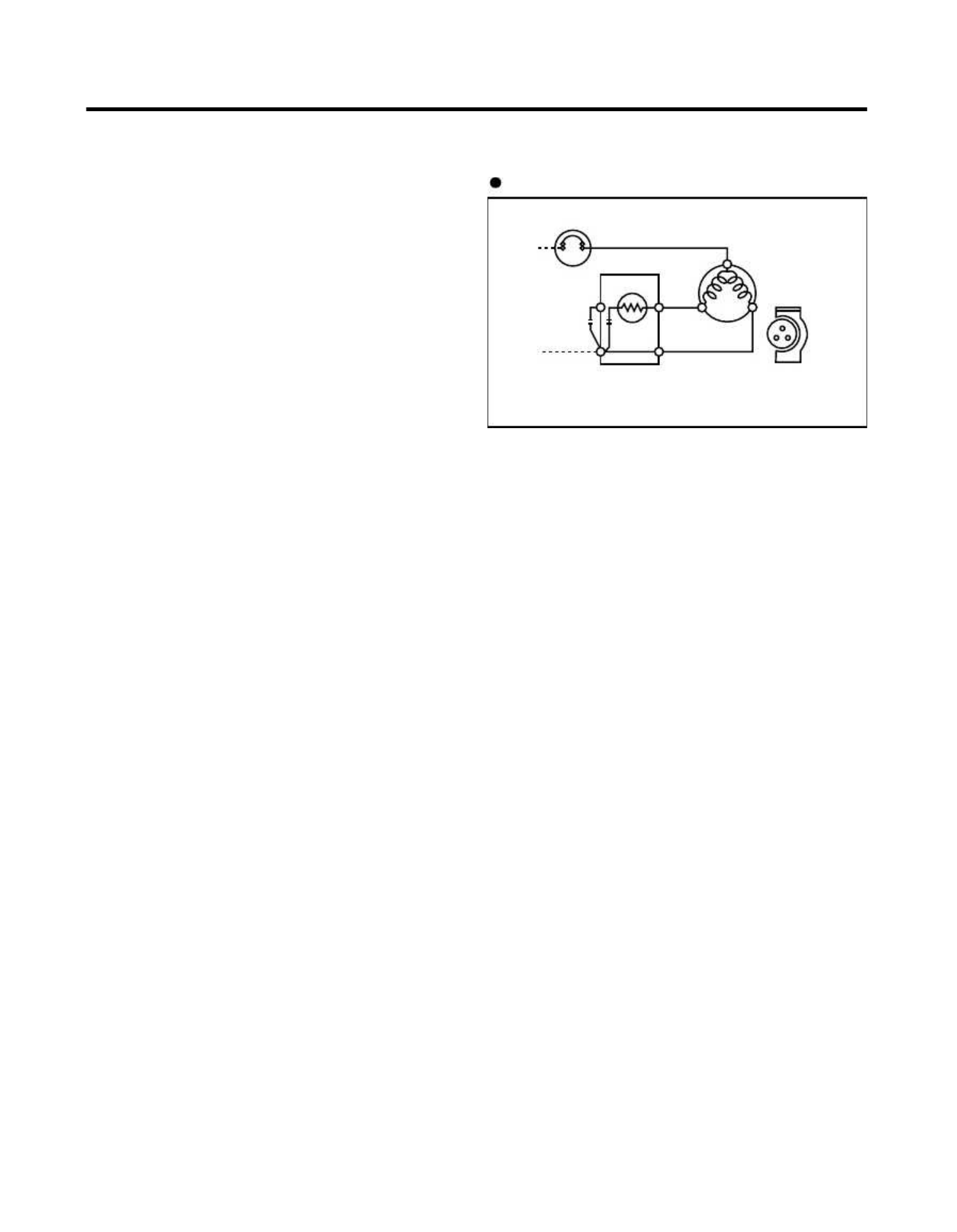
- -
11
11
--
4. ADJUSTMENT4. ADJUSTMENT
PTC STARTERPTC STARTER
SEALEDSEALED
TERMINALTERMINAL
COMPRESSORCOMPRESSOR
MOTORMOTOR
CC
MM
SS
MM
33
66
55
SS
NN
L1L1
OVERLOAD PROTECTOROVERLOAD PROTECTOR
Resistance Starter Capacitor RunningResistance Starter Capacitor Running
PTCPTC
4-14-1
-1-1
RolRol
ee
4-4-
11
COCO
MPMP
RERE
SSSS
OROR
The compressor intakes low temperature and low pressureThe compressor intakes low temperature and low pressure
gas from the evaporator of the refrigerator and compressesgas from the evaporator of the refrigerator and compresses
this gas to high-temperature and high-pressure gas. It thenthis gas to high-temperature and high-pressure gas. It then
delivers the gas to the condenser.delivers the gas to the condenser.
4-2-14-2-1
Composition Composition
of of
PTC-StarterPTC-Starter
4-4-
22
PTPT
C-C-
STST
ARAR
TETE
RR
(1)(1)
PTC (Positive Temperature PTC (Positive Temperature
Coefficient) is a Coefficient) is a
no-contactno-contact
semiconductor starting device which uses ceramicsemiconductor starting device which uses ceramic
material consisting of BaTiOmaterial consisting of BaTiO
33
..
(2)(2)
The higher the temperature is, the higher tThe higher the temperature is, the higher t
he resistancehe resistance
value. These features are used as a starting device forvalue. These features are used as a starting device for
the Motor.the Motor.
4-2-24-2-2
Role of PTC-StRole of PTC-St
arterarter
(1)(1)
The PTC is attached to the SealThe PTC is attached to the Seal
ed Compressor and ised Compressor and is
used for starting the Compressor Motor.used for starting the Compressor Motor.
(2)(2)
The compressor is a single-phase The compressor is a single-phase
induction motor.induction motor.
The starting operation, the PTC allows current flow toThe starting operation, the PTC allows current flow to
both the start winding and main winding.both the start winding and main winding.
4-2-34-2-3
PTC-Applied PTC-Applied
Circuit Circuit
DiagramDiagram
Starting Method for the MotorStarting Method for the Motor
4-2-44-2-4
Motor Restarting Motor Restarting
and PTC Cooliand PTC Cooli
ngng
(1)(1)
It requires approximately 5 It requires approximately 5
minutes for the minutes for the
pressure topressure to
equalize before the compressor can restart.equalize before the compressor can restart.
(2)(2)
The PTC device generates The PTC device generates
heat during operation.heat during operation.
Therefore, it must be allowed to cool before theTherefore, it must be allowed to cool before the
compressor can restart.compressor can restart.
4-2-54-2-5
Relation of Relation of
PTC-Starter PTC-Starter
and OLPand OLP
(1)(1)
If the compressor attempts to restart befIf the compressor attempts to restart bef
ore the PTCore the PTC
device is cooled, the PTC device will allow current todevice is cooled, the PTC device will allow current to
flow only to the main winding.flow only to the main winding.
(2)(2)
The OLP will The OLP will
open because of the open because of the
over currentover current
condition. This same process will continue (3 to 5 times)condition. This same process will continue (3 to 5 times)
when the compressor attempts to restart until the PTCwhen the compressor attempts to restart until the PTC
device has cooled. The correct OLP must be properlydevice has cooled. The correct OLP must be properly
attached to prevent damage to the compressor.attached to prevent damage to the compressor.
Parts may appear physically identical but could haveParts may appear physically identical but could have
different electrical ratings. Replace parts by part numberdifferent electrical ratings. Replace parts by part number
and model number. Use only approved substitute parts.and model number. Use only approved substitute parts.
4-2-64-2-6
Note for Note for
Using the PUsing the P
TC-StarterTC-Starter
(1)(1)
Be careful not tBe careful not t
o allow over-voltage and over-current.o allow over-voltage and over-current.
(2)(2)
Do not drop or handle carelessDo not drop or handle careless
ly.ly.
(3)(3)
Keep away from any liquiKeep away from any liqui
d.d.
If liquid such as oil or water enters the PTC, PTCIf liquid such as oil or water enters the PTC, PTC
materials may fail due to breakdown of their insulatingmaterials may fail due to breakdown of their insulating
capabilities.capabilities.
(4)(4)
If the exterior of the PTC If the exterior of the PTC
is damaged, the resistanceis damaged, the resistance
value may be altered. This can cause damage to thevalue may be altered. This can cause damage to the
compressor and result in a no-start or hard-to-startcompressor and result in a no-start or hard-to-start
condition.condition.
(5)(5)
Always use the PTC Always use the PTC
designed for the comdesigned for the com
pressor andpressor and
make sure it is properly attached to the compressor.make sure it is properly attached to the compressor.
Parts may appear physically identical but could haveParts may appear physically identical but could have
different electrical ratings. Replace parts by part numberdifferent electrical ratings. Replace parts by part number
and model number. Use only approved substitute parts.and model number. Use only approved substitute parts.
4-1-24-1-2
ComposCompos
itionition
The compressor includes overload protection. The PTCThe compressor includes overload protection. The PTC
starter and OLP (overload protector) are attached to thestarter and OLP (overload protector) are attached to the
outside of the compressor. Since the compressor isoutside of the compressor. Since the compressor is
manufactured to tolerances of 1 micron and is hermeticallymanufactured to tolerances of 1 micron and is hermetically
sealed in a dust and moisture-free environment, usesealed in a dust and moisture-free environment, use
extreme caution when performing repairs.extreme caution when performing repairs.
4-1-34-1-3
Note fNote f
or usageor usage
(1)(1)
Be careful not tBe careful not t
o allow over-voltage and over-current.o allow over-voltage and over-current.
(2)(2)
If compressor is dropped or If compressor is dropped or
handled carelessly, poorhandled carelessly, poor
operation and noise may result.operation and noise may result.
(3)(3)
Use proper electric components appropriate Use proper electric components appropriate
to theto the
Particular Compressor in your product.Particular Compressor in your product.
(4)(4)
Keep ComprKeep Compr
essor dry.essor dry.
If the Compressor gets wet (in the rain or a dampIf the Compressor gets wet (in the rain or a damp
environment) and rust forms in the pin of the Hermeticenvironment) and rust forms in the pin of the Hermetic
Terminal, poor operation and contact may result.Terminal, poor operation and contact may result.
(5)(5)
When replacing the Compressor, When replacing the Compressor,
be careful that dust,be careful that dust,
humidity, and soldering flux don°Øt chumidity, and soldering flux don°Øt c
ontaminate theontaminate the
inside of the compressor. Dust, humidity, and solder fluxinside of the compressor. Dust, humidity, and solder flux
contaminate the cylinder and may cause noise, impropercontaminate the cylinder and may cause noise, improper
operation or even cause it to lock up.operation or even cause it to lock up.
22
Contents Summary of Kenmore 795 71602 010
- Page 1REFRIGERATOR SERVICE MANUAL CAUTION BEFORE SERVICING THE UNIT, READ THE SAFETY PRECAUTIONS IN THIS MANUAL. Model #s: 795.71602.010 795.71603.010 795.71604.010 795.71606.010 795.71609.010 P/No. MFL63293403
- Page 2CONTENTS SAFETY PRECAUTIONS ........................ .................................... ......................... ......................... ........................ ......................... ......................... ........................ ......................... ......................... ....
- Page 31. SP SPEC ECIF IFIC ICA ATION TIONS S 1-1 DISCONNE DISCONNECT CT POWER POWER CORD CORD BEFORE BEFORE 1-7 REPLAC REPLACEME EMENT NT PARTS PARTS SERVICING 25cu,ft IMPORTANT – RECONNECT ALL 795. 71602.010 795. 71603.010 GROUNDING DEVICES 795. 71604.010 All parts of this appliance capable of conducting
- Page 425cu.ft ITEMS SPECIFICATIONS ITEMS SPECIFICATIONS DOOR DESIGN Side Rounded VEGETABLE TRAY Opaque Drawer Type DIMENSIONS(inches) 35 X 34 X 69 (WXDXH) 25cu.ft COMPRESSOR PTC Starting Type NET WEIGHT(pounds) 324.18 (25cu.ft) EVAPORATOR Fin Tube Type COOLING SYSTEM Fan Cooling CONDENSER Spiral Condenser
- Page 52. PARTS IDENTIFICA IDENTIFI CATION TION A N M B B C C D I J E K F G L H Use this page to become more familiar with the parts and features. Page references are included for your convenience. NOTE: This guide covers several different models. The refrigerator you have purchased may have some or all of
- Page 63. DISASSEMBL DISASSEM BLY Y 3-1 DOOR Refrigerator door 1. Remove the the top hinge cover and disconnec disconnectt the wire Gasket harness. Door Bracket Clip 2. Remove the ground screw. 3. Rotate the the lever hinge hinge and lift lift off hing hinge. e. Frame 4. Lift of offf the refrigera refriger
- Page 72. Insert Insert gasket gasket into channel channel 3-2 DOOR DOOR ALIGNM ALIGNMENT ENT 1) Snap ga gasket sket assembly assembly into into the door bracket. bracket. If the space between your doors is uneven, follow the Inserting the gasket assembly into the bracket door instructions below to align t
- Page 83-3 HOW TO REMOVEREMOVE AND REINSTAREINSTALL LL THE PULLOUT PULLOUT DRAWER DRAWER 3-3-1 FOLLOW STEPS TO REMOVE REMOVE Step 1) Open the freezer door. Step 2) Remove the lower basket. Step 3) Remove the the two screws screws from the guide guide rails rails (one Step 4) Lift the the freezer door door
- Page 93-3-2 FOLLOW STEPS STEPS TO REINSTALL Step 1) Reinstall Reinstall the right right side gear gear into the the clip. Step 2) Insert the the rail into into the right right side gear. gear. Gears do not Step 3) Insert the the rail into the left left side gear, gear, and insert the need to be perpendicu
- Page 103-3-3 PULL OUT DRAWER DRAWER To separate the drawer, push the front left left and right hooks in direction to to pull up and remove. Then gently lift the gear part of rear left and right side of the drawer and pull it out in direction. To install, reposition the gear part of rear left and right side
- Page 114. ADJUSTMENT 4-1 4-1 COMP COMPRE RESSSSOROR 4-2-3 PTC-Applied Circuit Diagram 4-1-1 4-1-1 Role Role Starting Method for the Motor The compressor intakes low temperature and low pressure gas from the evaporator of the refrigerator and compresses OVERLOAD PROTECTOR this gas to high-temperature and hi
- Page 124-3 OLP (OVERLOAD (OVERLOAD PROTECTOR PROTECTOR)) 4-4 TO REMOV REMOVE E THE COVE COVER R PTC 4-3-1 Definition Definition of OLP (1) OLP (OVERLOAD PROTECTOR) PROTECTOR) is attached to the compressor and protects the motor by opening the circuit to the motor if the temperature rises and activating the
- Page 135. CIRCUIT DIAGRAM - 13 -
- Page 146. TROUBLESHOOTING 6-1 Error Error Code Code Summar Summary y WARNING: When you check the Resistance values, be sure to turn off the power. And wait for the voltage-discharge sufficiently. Error Display Error Detection NO Freezer Ref. Error Generation Factors Remark Category Temperature Temperature
- Page 157. PCB Picture 7-1 7-1 Ma Main in PCB PCB P/No & MFG Picture CON9 CON3 CON4 EBR67348005 CON2 (2010.03 ~) CON5 CON8 CON1 - 15 -
- Page 167-2 Displa Display y PCB & Sub Sub PCB P/No Picture CON01 Display PCB EBR42479305 (2010.03~) - 16 -
- Page 178. Troubleshooting With Error Display 8-1 Freezer Freezer Se Sensor nsor Error (Er FS) No Checking flow Result & SVC Action 1 Check for a loose connection. 2 Check the Blue/White to Blue/White. Result SVC Action 0 Short Change the sensor Infinite Open Replace the refrigerator ohms See Check the Temp
- Page 188-2 Refrigerato Refrigeratorr Sensor Sensor Error Error (Er (Er rS) No Checking flow Result & SVC Action 1 Check for a loose connection. 2 Check the White to White. Result SVC Action 0 Short Change the sensor Infinite Open Replace the refrigerator ohms See Check the Temp and resistance Normal resist
- Page 198-3 Ici Icing ng Sensor Sensor Error Error (Er (Er IS) No Checking flow Result & SVC Action 1 Check for a loose connection. 2 Check the Red to Bright Orange. Result SVC Action 0 Short Change the sensor Check the resistance of the blue wires (shown in number 2 to the left) If Infinite they are open b
- Page 208-4 Defrost Defrost Senso Sensorr Error Error (F dS) No Checking flow Result & SVC Action 1 Check for a loose connection. 2 Check the Orange to Orange. Result SVC Action 0 Short Change the sensor Infinite Open Replace the refrigerator ohms See Check the Temp and resistance Normal resistance (Table-3
- Page 218-5 Defrost Defrost Heater Heater Error (Er dH) No Checking flow Result & SVC Action 1 Check the Door gasket. Part Result SVC Action 2 Check the Defrost control part. 0 Go to the 3 Fuse-M Other Change Fuse-M Fuse Defrost Defrost 34~42 Go to the 3 M Sensor Heater Change Fuse-M Other Defrost 21 Go to
- Page 228-6 Freezer Freezer Fan Fan Error Error (Er (Er FF) FF) No Checking flow Result & SVC Action 1 Reset the unit and Input Test 1 Mode. (Push the button 1 time) 2 Open the freezer door and Check the Status SVC Action air flow. While an error code is displayed, No airflow Go to 3 the fan is not working.
- Page 238-7 Conden Condenser ser Fan Fan Error Error (Er CF) CF) No Checking flow Result & SVC Action 1 Reset the unit and Input Test 1 Mode. (Push the button 1 time) 2 Check the fan rotating. Status SVC Action While an error code is displayed, No airflow Check motor the fan is not working. Airflow Go to th
- Page 248-8 Communicati Communication on Error Error (Er CO) No Checking flow Result & SVC Action 1 Check the loose connection. 2 Check the Orange to White/Black. Result SVC Action 12 V Go to the 3 Check the Hinge CON01 Other (loose connection) Change the Main PCB
3 Check the Orange to Br - Page 259. Troubleshooting Without Error Display 9-1 Freezer room AC Bulb Lamp doesn’t work No Checking flow Result & SVC Action 1 Check the Freezer door switch. If feel sticky, Change the door s/w. 2 Check the door S/W resistance. Status Result SVC Action 0 Go to the 3 Normal Infinity Change door S/W Push
- Page 269-2 Refrigerator room lamp doesn’t work No Checking flow Result & SVC Action 1 Check tth he Refrigerator do door sw switch. ch. If feel stick cky y, Chan hange tth he do door s/ s/w. 2 Check the door S/W resistance. Status Result SVC Action 0 Go to the 3 Normal Infinity Change door S/W Push Infinity
- Page 279-3 Poor cooling in Fresh food section No Checking flow Result & SVC Action 1 Check the sensor resistance. (1) To (2) Result 23°F / -5°C 38.5 ~ 36.5 32°F / 0°C 30.5 ~ 29.5 41°F / 5°C 24.5 ~ 23.5
50°F / 10°C 20 ~ 19 59°F / 15°C 16 ~15.5 The sensor is determined by the temperature. For For exam - Page 28No Checking flow Result & SVC Action 5 Damper checking method. Test Damper Inputting TEST Mode, SVC Action Mode State Check the damper and PCB. 1 Mode Open Damper is normal. 2 Mode Closed 1,2 Not Change the damper mode working Test Point Result SVC Action 270 ~330 Normal (1) to (2) Other Change damp
- Page 299-3 Poor cooling in Freezer compratment No Checking flow Result & SVC Action 1 Check the sensor resistance. (1) To (2) Result -22°F / -30°C 40.5 ~ 38.5 -13°F / -25°C 30.5 ~ 28.5 -4°F / -20°C 23 ~ 21.5
5°F / -15°C 17.5 ~ 16.5 14°F / -10°C 13.5 ~ 12.5 The sensor is determined by the temperature - Page 309-4 Over cooling in Fresh food compartment No Checking flow Result & SVC Action 1 Check the sensor resistance. (1) To (2) Result 23°F / -5°C 38.5 ~ 36.5 32°F / 0°C 30.5 ~ 29.5 41°F / 5°C 24.5 ~ 23.5
50°F / 10°C 20 ~ 19 The sensor is determined by 59°F / 15°C 16 ~15.5 the temperature. For For - Page 3110. Reference 10-1 TEST MODE and Removing TPA T PA 1. How to enter the TEST MODE If you push the test button on the Main PCB, the refrigerator will be enter the TEST MODE. * 1 time : Comp / Damper / All FAN on (All things displayed) * 2 times : Damper closed (22 22 displayed) * 3 times : Forced defr
- Page 3210-2 TEMPERATURE CHART - FREEZER AND ICING SENSOR TEMP RESISTANCE VOLTAGE -39°F (-40°C) 73.29 4.09 V -30°F (-35°C) 53.63 3.84 V -21°F (-30°C) 39.66 3.55 V -13°F (-25°C) 29.62 3.23 V -4°F (-20°C) 22.33 2.89 V 5°F (-15°C) 16.99 2.56 V 14°F (-10°C) 13.05 2.23 V 23°F (-5°C) 10.10 1.92 V 32°F (0°C) 7.88
- Page 3310-3 TEMPERATURE CHART - REFRIGERATOR AND DEFROST SENSOR TEMP RESISTANCE VOLTAGE -39°F (-40°C) 225.1 4.48 V -30°F (-35°C) 169.8 4.33 V -21°F (-30°C) 129.3 4.16 V -13°F (-25°C) 99.30 3.95 V -4°F (-20°C) 76.96 3.734 V 5°F (-15°C) 60.13 3.487 V 14°F (-10°C) 47.34 3.22 V 23°F (-5°C) 37.55 2.95 V 32°F (0
- Page 3410-4 How to check the Fan-Error (1) EBR673480 EBR673480 After sending a signal to the fan, the MICOM checks the BLDC fan motor s lock status. If there is no feedback signal from the BLDC fan, the fan motor stops for 10 seconds and then is powered again for 15 seconds. To determine that there is a fa
- Page 3511. COMPONENT TESTING INFORMATION 11-1 Defrost Controller Assembly Function - Controller Controller assembly assembly is consist consist of of 2 kinds of of part those those are fuse-m and sensor. sensor. we can can decide part is defect or not when we check the resistance. - Fuse-M can can cut off
- Page 3611-2 Sheath Heater Function Sheath heater is a part for defrost. How to Measure (1) (2) Measure the 2 pin connected to Sheath Heater. If resistance is between 34 ~ 42 ohms, the heater is normal. If it measures infinite ohms the heater is open and needs to be replaced. Standard Sheath heater (at all
- Page 3711-3 Door Heater Assembly Function The heater is designed to prevent the exterior moisture on the door. How to Measure 1 3 2 6 4 5 7 8 9 Standard Test Point Ressult (1) to (2) 2.3 ~ 2.9 - 37 -
- Page 3811-4 Door Switch Function Senses when the door is opened or closed by sending a signal to the Main PCB. How to
- Page 3911-5 Damper Function The damper supplies the cold air from the freezer to the refrigerator section. How to Measure < Damper Circuit > 1 Blue 1 Blue 2 Red 3 White 3 White 3 Yellow Check the 1 , 3 < extension > Check the 2 , 4 Check the 1 , 3 Check the resistance between connectors 1,3 and 2,4. Standa
- Page 4011-6 Light Bulb Socket Function Make sure the light bulb is screwed in tight to the light socket. How to Measure (1) (2) (3) (4) Check the resistance between connector of housing and connector of lamp socket. Standard Test Points Result (1) to (2) and (3) to (4) 0 - 40 -
- Page 4112. TROUBLESHOOTING TROUBLESHOOTING 12-1 SERVICE DIAGNOSIS CHART COMPLAINT POINTS TO BE CHECKED REMEDY No Cooling. • Is the power power cord unplugged unplugged from the outlet? outlet? • Plug Plug inintoto the the outl outlet. et. • Check ifif the power switch switch is is set to to OFF. • Set the
- Page 4212-2 REFRIGERATION CYCLE Troubleshooting Chart TEMPERATURE STATE OF STATE OF THE OF THE CAUSE REMARKS THE UNIT EVAPORATOR COMPRESSOR PARTIAL Freezer Low flowing sound of A little higher than • Refrig Refrigera erant nt level level isis low due due LEAKAGE compartment and Refrigerant is heard ambient
- Page 4312-2-2 SEALED SYSTEM DIAGNOSIS “Not Cooling” Complaint All components operating, No airflow problems, Not frosted up as a defrost problem problem has been isolated to sealed system area Partial Frost None Pattern? Equalization Equalization Test Test Very Fast Very Slow Very Slow Fast Very Fast Ineff
- Page 4413. ICE MAKER AND DISPENSER WORKING PRINCIPLES AND REPAIR 13-1 Working Principles 13-1-1 Ice Maker Working Principles Power Input Level Ice Maker Cube Mould for “Initial Control” Initial Control after power is input. Ice Making Wait until the water in the cube mould is frozen Control after ice maker
- Page 4513-2 Function of Ice Maker 13-2-1 Initial Control Function 1. When power is initially applied or reapplied after power cut, it detects level of ice maker cube mould mould after completion of MICOM initialization. The detecting lever moves up and down. 2. The level of ice maker cube mould is judged b
- Page 4613-2-4 Ice Ejection Control Function 1. This is to eject ice from ice maker cube mould after ice making is completed.completed. 2. If Hall IC signal is on within 3.6 3.6 seconds after ice ejection motor rotates in normal direction, it does not proceed ice ejection but waits. If the ice bucket is ful
- Page 4713-2-5 Test Function 1. It is to force the operation during operation test, service, and cleaning. The test switch is mounted under the automatic ice maker. The test function starts when the test switch is is pressed for more than 0.5 second. 2. Test button does not work during ice ejection and wate
- Page 48600A 600B 616E 623A 623B 627B 619A
- Page 49
- Page 50CASE PART
- Page 51CASE PARTS FREEZER PARTS CAUTION: Use the part number to order the part, not the position number. 250C 145C 250D 250E 136B 145G 250D 250C 131A 145J 145K 145F 237C 145M 145J 145H 136A
- Page 52REFRIGERATOR PARTS CAUTION: Use the part number to order the part, not the position number. 141A 141B 141A 141B 141C 141A 141B 141C 141A 141C 141B 141D 161C 141C 161B 154A 151A 151B 146E 161A 145E 162B 145D 162A
- Page 53REFRIGERATOR PARTS DOOR PARTS
- Page 54DOOR PARTS CAUTION: Use the part number to order the part, not the position number. 230B 230A 241A 231B 233B 233C 233D 233A 231A 241C 241B 234C 234D 234B 234A 212G 241D 241D B05 B05 241D 244A 244A 241D 241E 241D 241E 243C 243C 243A 243A 243B 243B B05 B05 S25 249E S25 262C 262C 249G 250B 205C 249J 25
- Page 55